Showing posts with label technology. Show all posts

Monday, July 18, 2011

What I got last week (and Succinctly Yours!)

I needed (okay, maybe wanted really badly!) another fast computer in the house. We have our dinosaur computer (painfully slow)used just for word processing in our redone basement, but let's face it-it's still the basement...
  • I needed the portability of a smart phone (I love my phone but typing on it for long periods of time isn't fun.)
  • I needed the processing power of a desktop (I love our main computer but I am stuck in one locale and everyone else loves it too!)
  • I needed the convenience of a laptop(but I didn't want a huge machine to lug around).
  • And let's face it-who wouldn't want the fun of a tablet pc?
  • I wanted a combination of all of these all rolled into one...
What I got was: my new HP TouchSmart tablet laptop. It is only four pounds so very easy to move around. It has an i3 processor, and although not the fastest out there (they have i5 and now i7), it's quick enough for me. And I can toggle between entirely touch screen like a tablet (the screen flips 180 and lies flat on the keyboard), or use my included stylus or keyboard at any time while the laptop is upright. It came loaded with Windows 7 which I am slowly getting used to, but a very bare Microsoft Office that I may or may not upgrade. And you may not be able to tell but the case is pretty snazzy-no excess fingerprint problems! But the bottom line is I'm loving this new machine. (I haven't let anyone else touch it although both my kids are quite interested-LOL!)


Can I hear a collective "ooh"? But it's also time for Succinctly Yours, another writing meme that piggy backs on the idea of Susan of the Stony River Blog.
Grandma Goulash posts a picture and you are to write a 140 character or word story about it. You can also use the word of the day in your post if you wish. This week's word is obscure. Here is the picture and my story:
It was our place, a place we had been to a thousand times before. But I never knew him until that day-when he slowly tore my heart in two. (139 characters)

It's way too late to come around your blogs now, but I can't wait to check what you all wrote tomorrow!

Wednesday, January 19, 2011

Move over Ipod-meet Chumby I (Review)

As a self appointed geek, I am always on the lookout for the new and upcoming tech toy either for members of my family or myself, and I am pretty taken with one of our latest additions, the Chumby I. I can almost hear you muttering, "What’s a Chumby?" because that’s exactly what I said when I read about it in November, but it’s been only a few weeks and we are enamored with this little device.

You see, every Christmas I give my husband some things that he needs, and some that he doesn’t-in other words "toys"-and I was on the look out for something tech to fill "that need."  I think I did a search on Google for "best cheap tech gifts" and one of my favorite tech sites, PC World, popped up with the article, "Terrific Tech Gifts for $200 or Less", and let's just say I was aiming for less...

 Anyhow, the site had a slide show of 14 tech gadgets that were worthy of purchase, and I was on slide number 12 when I saw the Chumby One for the first time. Now the price was still a little too high for me, but when I did a search for information that was only Chumby related, I found out that the Chumby website was offering the device for $79 with I think free shipping and handling-this was down from the normal price of $129.95!


I read more reviews at another favorite technology website-CNET.com-to get their take and they gave it high marks. Yes, I still haven't told you just what this thing is... It’s a small, wireless device that you can keep on your bedside table to wirelessly connect to the Internet. It’s 3.5 inch touch screen allows you to view comments on Facebook, check the latest weather forecasts for your area, connect to Pandora radio, check e-mail, play games, and the list goes on and on.


There are several “channels”in the Chumby  that you can program with around 1000 apps downloaded from the Chumby.com site (all gloriously free I might add). My husband has a channel that’s just weather related, another for news and sports from sites like ESPN and CBS, and he has a gaming/web cam/ "fun" channel. He picks the channel and the apps loop continuously (with a time for each site determined by him). If he wants to look at the site more closely, he hits the screen and the looping stops, and if he doesn’t want an app anymore, he simply logs into his account on the Chumby site from a computer, and deletes it.

This thing can also be a clock, so the old, outdated alarm clock that used to grace his nightstand is now gone. He can set an alarm with the Chumby One and wake up to music from Pandora, or other various alarms he can choose. Right now it’s a taps alarm with the bugle sound getting louder and louder the longer it plays-thank goodness I’m up before it goes off, but I can sometimes hear it from the bathroom… There is also a night mode that keeps the Chumby from looping, lowers the lighting on the screen, and shows only the time.

The Chumby One is the second of two models that came out in 2009. Unlike the original Chumby that has soft leather sides, and is slightly larger (and more costly) with some impressive features, the Chumby One can use a rechargeable lithium ion battery(the older model has to be plugged in), has one USB 2.0 high speed port, 2W mono speakers, an FM tuner, 454 MHz ARM processor (larger than the older model), 64 MB DDR SDRAM, and Internal microSD card firmware.


This device is like an iPod, Wipad, alarm clock, DS, radio, and digital photo frame (you can loop your Facebook pictures as well) all rolled into one. I can’t tell you how many times the kids have jumped on our bed to check out the Chumby screen. In fact, my husband just added an app that counts down the days to each of our birthdays, and the cake image on the screen continually changes the closer the date gets. (My daughter’s birthday is in March, and she now has a three-layer cake with icing…)

The thing is so cute that my daughter and I both want one, so I’m going to keep on the lookout for any discounts and sales. If you want to read more about the Chumby One, a good place to go is the CNET site or to the Chumby site (it will help you get a good idea about all the apps available and give you information about each model.)

I did want to point out that Sony came out with a competing device this year called the Sony Dash-it has a 7-inch touch screen that sells for $199. But I found out the Dash is just a Chumby in disguise because it was made in collaboration with Chumby (it runs with the Chumby operating system and uses all of the Chumby site apps) but it comes in a fancier package with a fancier price tag. So, based on price, (cuteness), portability, and good reviews for Chumby, I went in that direction, but I anxiously await the next new tech toy that combines the best of both…


*I just noticed that the Chumby site is actively advertising the Sony Dash as well, so it is a true partnership.


This review was done without any compensation from Chumby, CNET, or PCWorld.  I bought a Chumby this Christmas, and all opinions I have given are mine and may differ from others but were not influenced by any of the companies mentioned. All pictures in this post were taken by me to show some of the apps available.

Thursday, January 6, 2011

Technology Toys (a couple reviews and excuses)

I was supposed to do a couple reviews this week-that was the plan at least, but we all know that sometimes life gets in the way. First the excuses-I had a very sick little girl still recovering from a bout of strep throat and nasty stomach bug, and my adjustment back to work was a wee bit difficult after being off for so long. I developed a nasty habit of staying up later and later so it took me more than a few days to readjust to an earlier bedtime. And, my bewitching hour is near, so this post is going to be a teaser for meatier reviews to come.

Technology toys were the "it" items in our house this Christmas, so I wanted to give a brief overview tonight on one of the hits and one of the misses. Santa brought a number of Dsi games for the kids based on online reviews, but the biggest test of a toy is whether your child actually plays with it or not. Two games stood out from the crowd-Zelda Spirit Tracks and Professor Layton and the Unwound Future-but the clear favorite by everyone was the Zelda game. In fact, I started playing it when I found myself a little talked out at my in-laws, and I couldn’t put it down. It literally drove me crazy when I couldn’t figure out the combination of the secret tunnel-the game gave hints about what to push in what order to open the door! The whole game is like this-you are constantly thinking of how to do things, so if your kids like a lot of mental exercise (and you do too), then this game's for you. A note of caution: both my kids enjoyed this game so much that you can imagine how tough it was to share…

A possible "miss" this Christmas might have been Duck Hunter Xtreme. I bought this toy for my husband because it was something that my son picked out personally. I originally thought that since it is a two-person game (one person has to fly the duck while the other takes aim with the "infrared" gun) it would be a good one for the kids to play with their dad. I quickly looked at the age ranges for the toy (ages 10-15) but didn’t worry too much since my son has a couple remote control items already. One problem right off the bat is that this toy takes a huge amount of batteries-the shooter takes 3 AAA batteries and the remote control takes 6 AA batteries-then you have to wait an additional 10 minutes to "charge" up the duck.

The irritants don’t just stop there. My husband is quite the aficionado when it comes to all things electronic, and remote control airplanes make up some of his collection, but this duck is quite different. It flies extremely fast (I was more than a little scared of the thing) and at least right out of the box it would only fly a few laps before losing altitude and coming down-there was no time for any shooting because we were mostly ducking.(No pun intended...) And speaking of shooting, there is no beam that you line up to shoot-just an annoying shotgun sound, so I’m not sure how the gun actually brings the duck down. The toy claims to be for both inside and outside use, but we now know that a normal sized room isn’t nearly large enough to fly this thing. If you were looking at this toy before Christmas, or are looking at it now, you might want to reconsider-the duck was packed up, and hasn’t been taken out again.

Well, that's all for tonight, but I will be back in a couple days for another review.
*Note: Zelda images are free screen shots used for the sole purpose of my review, while the Duck Hunter Xreme image links to its source-the Amazon website.

Thursday, April 29, 2010

Education Vs. Games

I am always cautious when it comes to introducing my kids to the newest technology toys- I would rather see them exercising their bodies and brains. My daughter pleaded for a Nintendo DS for three years before I thought she was old enough to have one, and I am very picky about the games we purchase (they have to be both entertaining and educational.) But whether it is a boy/girl or birth order thing, it’s been harder to keep my son from idolizing technology games and gizmos. Throw in the fact that my husband has a small menagerie of gaming devices and wants to share these with said son and it becomes downright impossible.

But it wasn’t until these two gaming buddies downloaded a free, but what I consider pointless and violent wizard game from the Internet, that I thought I had better step in. If I couldn’t keep my son away from the games, I could at least expose him to those I thought were more educational in nature. Thankfully the JumpStart Company, very well known for their educational games, contacted me about a review of their online site, and timing being everything, I hurriedly accepted.

Unfortunately, start up wasn’t as easy as I thought, and most of this was due in part to our DSL router that was slowly dying. Our Internet connection grew slower and slower, and if you don’t have a fast Internet connection either through a DSL line or Cable modem, playing these online games is next to impossible. But even with our router fixed, there definitely was a learning curve when it came to figuring out how to set up individual players and where to go to actually start play. There are a lot of places that you can click on like connection to Facebook pages, inviting friends, and Wii games, and with each having it’s own drop down list, at first it can seem a little overwhelming. It also took a little time (and a couple disagreements) to figure out how to let each of my kids have their own avatar to play the games, but that’s because the kids wanted to play right away while I wanted to stop to read all the information.

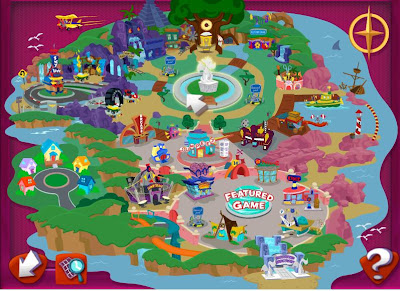
But when things were finally up and running full force, and nobody could blame the other for changing their avatar character, the kids really enjoyed the JumpStart site. The site itself is aimed at kids ages 3-10, but it’s divided into “worlds”-each world has characters that help your Avatar explore and solve problems, and these worlds are more specifically rated for particular age groups. (I.e. Story Land is for beginner readers ages three to five, Adventure Land is for ages five to eight) There is also a downtown section where kids can customize their avatars with clothes and pets. You move your avatar to different worlds by clicking on the map in the corner of the screen or by using both the keyboard direction arrows and mouse. (Worlds that are for smaller kids utilize only the mouse.)

I was pretty blown away by the graphics-screen shots are detailed and in 3-D and to say that they are engaging is definitely an understatement. I also liked how JumpStart wasn’t all education or all entertainment. The kids could complete educational games (disguised as missions) that allowed them to practice reading or math, and they earned points for their successes. They could also explore each world and rack up points for negotiating obstacles along the way.

The games were a great fit for my seven year old son, but I had to keep watch to make sure he completed the educational parts of the missions-he was pretty content to just run around the different worlds. There is also some patience involved with the games because there is a small wait time while different worlds load. My son is also new to using a keyboard and mouse simultaneously, and being left-handed he initially had some trouble. His favorite worlds were Adventure Land, Future Land, and Marine Land, and each world had a nice combination of fun as well as teaching elements.

My eleven-year-old daughter enjoyed all the personal touches involved with the avatar characters-dressing them, adding and decorating their houses, and acquiring pets-but I insisted that she needed to participate in the learning activities as well, and she too was challenged by the games in Future Land because this area allowed her to practice her multiplication and division skills.

Our experience with this educational Internet site was an overly positive one, and I don’t hesitate about recommending it to any of you. But while I agree that the games are a good match for someone my son’s age, I am not sure that a three year old could handle or understand how to move the avatar around to the different communities. I am also hopeful that the company will add additional age ranges so that my daughter can continue to enjoy the site.
Check them out to see if they are a good match for you too.


The opinions expressed in this post are my own. I was only compensated with a trial membership for the sole purpose of writing a review.

Friday, January 15, 2010

I'm dreaming of a mini laptop... (Simplify My Life Sweepstakes)


You could win an HP Mini 110!

Mama wants a new toy, but not just any toy-I want an HP Mini with Windows 7 to help simplify my life. Yes, I can just see it now, the Mini and I are getting to know one another in my kitchen as I peruse the Internet for interesting new recipes, and the latest Windows operating system with high definition graphics allows me to see included images clearly and quickly.


But wait there’s more, so much more! At only 3.22 lbs. and less than 2 inches thick, I am able to take my new Mini anywhere, including my daughter’s gymnastic meets. It’s built in WI FI capability enables me to use the down time between events wisely, and I connect to my online grade book and enter scores from my midterm exams. This added convenience means less time away from my family on the weekends, and less guilt in the workforce.

And let’s face it-blog and e-mail updates will be a lot more comfortable using a keyboard that is almost as big as a full size model instead of jamming my thumbs on a Qwerty keypad. With this little baby I won’t have to worry about pressing wrong keys or accidentally deleting comments, like I do on my cell phone. I can relax in a favorite easy chair and be where my family is instead of shut off in another area of the house.

I start to feel all warm and fuzzy inside, as I think how the Mini’s built in Web-cam will allow my seven and ten year old to have “visual” chats with all their relatives. Keeping the lines of communication open is next to impossible when all of your family lives on the other side of the state, and a phone conversation just isn’t the same.

I heave a sigh and wipe a stray tear as I glance at the seven-year-old desktop sitting in front of me. This computer is slow but it does what I need it to do-it’s just sad when a computer science teacher’s technology gizmos don’t measure up to those of her students. And ever since our old dinosaur desktop went on the fritz, my tech savvy kids want a piece of this computer too, and mama isn’t willing to share all that much.


I could go on and on about how this wonder of a laptop could provide me some relief, but I think I’ll let you envision the possibilities on your own-take a look at what you could win with one little comment...


The Mom Blogger’s Club, HP, and Olympian Dara Torres are giving away three Mini 110-1100 laptop PCs to three random commenters on the finalist’s blog post. That could be you!  Or visit The Mom Blogger’s Club and create an entry of your own. But do hurry because the last date for entry is January 20.


Wednesday, September 2, 2009

Technology: Friend or Foe

The Dilemma: Is technology a "friendly" source of pleasure or something to be watchful of?

Birthdays come around so quickly anymore. I can still see my kids as infants running around in nothing but a diaper, so when another year passes, it always takes me by surprise. This year my husband and I had a dilemma. Should we cave in and get my son the latest technology gizmo that some of his elementary school friends already have, or should we hold off on getting him hooked on computerized games at what I think is too young an age? The toy he was hinting at is the Nintendo DS, and we are pretty familiar with this gaming system because my daughter received one for her birthday just this past year. (Yes, we caved in, but we figured she was now old enough, and besides, she is so involved with other activities and her friends, that playing the games-which consist mainly of career exploration activities-isn’t a premium interest.)My son, on the other hand, has school, activities at home, and the occasional soccer match in the spring to keep him occupied. So the real fear is his getting “hooked” on the gaming since it might be the most appealing activity he has right now.

The Decision

Well, we decided to focus instead on feeding his imagination and keeping his body fit. I worry when some of the teenagers I come into contact with at school tell me about how late they were up the night before playing these games, so why should I start my son down this road now? He has a wonderful imagination, and he often shares his latest storyline when he is playing with some of his super hero action figures. He can also play with Legos and puzzles for hours because he seems to be fascinated with putting things together. So we are still going to keep the super hero theme alive and get him action figures and toys that let him think, and since the weather is still nice, we are getting some things that will promote his activities outdoors. It is my hope that years from now he probably won’t remember the computer game that was popular at the time, but he will remember running around outside with his friends and family.
>